
I want to add a comment and site information to an individual used IP address in IPAM on Infoblox DD

I want to add a comment and site information to an individual used IP address in IPAM on Infoblox DDI.But I am unable to do so.
Can anyone help me here?
Answers
-
On NIOS or Universal DDI (BloxOne)? Also, when you say "Individual used IP address", do you mean a reservation? The IP address needs to be associated with an "object" (e.g. Reservation or Fixed Address, etc.) On the object you can set a description and add Extensible Attributes/Tags.
0 -
Hello Stafford,
Thank you for your reply.
We have DHCP Server on Infobox DDI.Also It is showing DHCP Lease.In that DHCP lease we want to add comment and site on individual DHCP Lease address.
Can you help us here?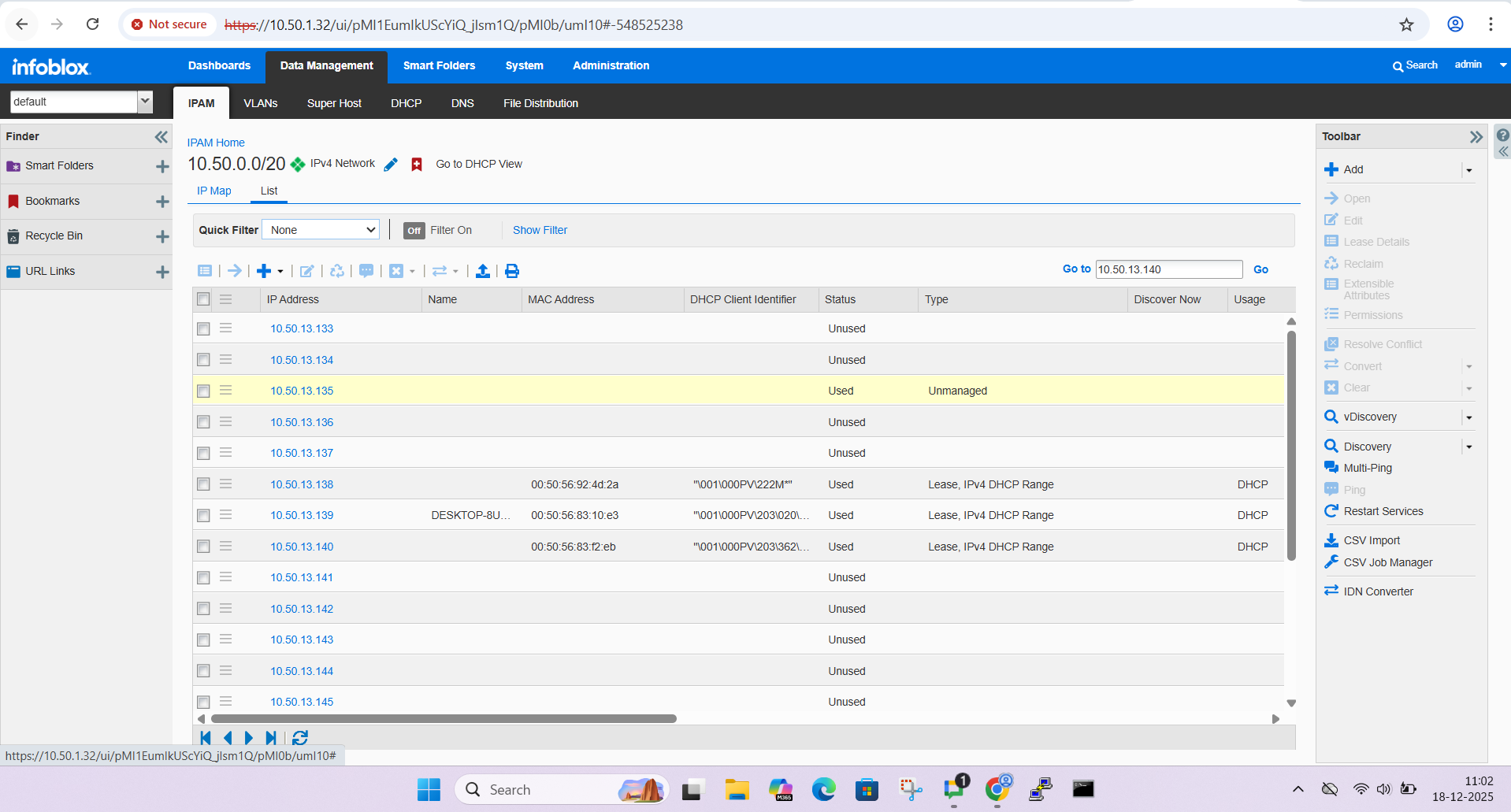 0
0 -
Without knowing more of the background to the request, take the following information carefully as it may or may not be relevant to you.
DHCP leases come and go. Adding site information and comment would be like trying to tag every individual guest that comes into your guest network. That doesn't scale because they can come and go rapidly.
In a guest environment, what you could do is try and restrict a given RANGE and/or SUBNET to a specific location and maybe a specific floor/building, etc. Then set comment and Extensible Attribute to the RANGE and/or SUBNET.
You can't set data on a lease but what you can do is create a Fixed Address or a Host object. Both are a way of ensuring that a specific device always gets the same IP. Both have have Extensible Attributes set (e.g. Location) and can also have comments set. Depending on what data you are trying to capture in the comment, consider an Extensible Attribute instead.
Fixed Address you just need to specify the MAC address of the client and the IP you want it to have every time it connects.
Host is similar but you can also set the DNS record, etc.
In this way, you can set data that is associated with a specific device and IP address.
1 -
Hello Stafford,
Thank you for the update.I Would like to get more information about Device Discovery.
As I have added one Network in IPAM.I need VLan information and Device Location in used IP address.
Can you please help us here?0 -
Hi Stafford,
Can you please share us a Meeting Link ?
As we need to clear some questions and doubts about Infoblox DDI.
0 -
When you say "I have added one network"… do you mean that you manually created the network in the UI or that Network Insight found the network and added into the DB?
I see in the image above a line that is yellow. That is a discovered IP (in this case) but you cannot do anything with it because it is "unmanaged". Unmanaged means "Network Discovery found it but you (the admin) haven't told NIOS that it should actually exist". You can convert "Unmanaged" to "Managed" and then you can edit it and set extensible attributed.
Network Discovery can (depending on what data it finds) add VLAN information to the NETWORK which will then be visible in the columns when you view the IP ADDRESSES inside the NETWORK. You may have to edit which columns are visible. You can also manually set VLAN as an Extensible Attribute.
I believe (but I'm not sure) that the in-built "Location" field is set by Network Insight based on the data it finds and can only be set by Network Insight.If you are expecting NIOS to show "Location" and "VLAN" based on what Network Insight finds, and if you are seeing that the data is not there, I recommend a support ticket.
This is a community site so if you need someone to join a meeting, you will need to raise a support ticket or reach out to your account team.
0


Categories
- All Categories
- 5.2K Forums
- 3.5K Critical Network Services
- 467 Security
- 1.2K Asset Visibility
- Ideas Portal
- Webinars & Events
- 285 Resources
- 285 News & Announcements
- Knowledge Base
- Infoblox Documentation Portal
- Infoblox Blog
- Support Portal
- 8 Members Hub
- 4 Getting Started with Community
- 4 Community Support